
Exporting pending invites can be useful if you want to review outstanding invites, follow up with users, or keep a record of invitations that have not yet been accepted.
Who can export pending invites?
This feature is available to:
- Super Admins
- Member Managers
What does Export Pending Invites do?
When you use this option, the system generates a CSV file containing all current pending invitations. This gives you an easy way to view and manage users who have been invited but have not yet joined the portal.
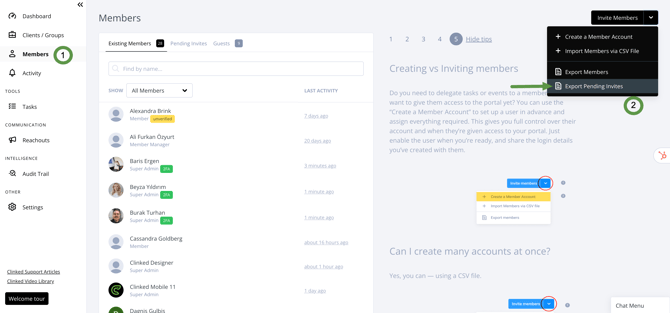
How to export pending invites
Follow these steps:
- Go to the Members area.
- Click the upside-down arrow menu.
- Select Export Pending Invites.
- The system will generate and download a CSV file containing the list of pending invites.
What information is included?
The exported CSV file will provide a list of pending invitations currently in the system. This can be used for tracking and follow-up purposes.
If you have questions or need help, please contact us via support@clinked.com.