
The setup is intentionally simple: once your Copilot agent is ready in Microsoft Copilot Studio, you can add it to Clinked by pasting the embed code snippet into the integration settings.
There is no complex technical setup required within the portal. After the code snippet is added, the Copilot agent becomes available through a launcher button inside the portal, allowing users to access the assistant without leaving the page.
Installation Process
- Create and publish your Copilot agent in Microsoft Copilot Studio.
- Copy the embed code snippet generated for the agent.
- In Clinked navigate to Client/Group > Settings > Integrations
- Enable the “Microsoft Copilot AI Agent” integration.
- Paste the code snippet into the provided field.
- Save the configuration.
Once saved, the Copilot AI Agent is available in the portal and ready to use.
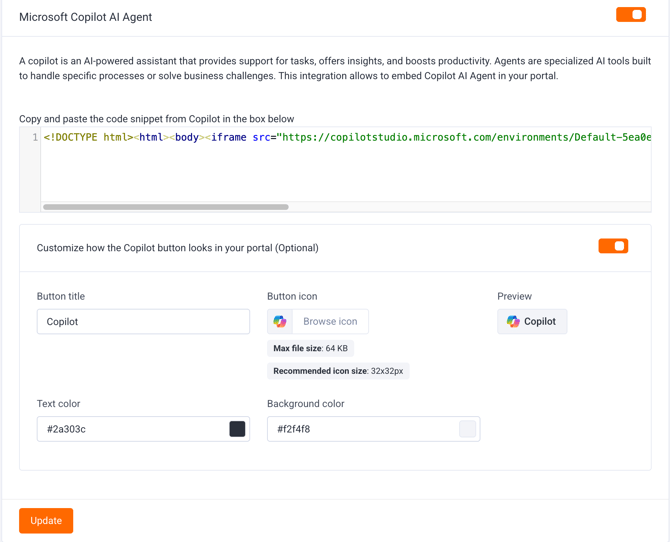
Branding and Customization
Clinked also allows the Copilot launcher to be styled so it fits naturally within your portal experience. You can customize:
- Button title
- Button icon
- Text color
- Background color
This gives organizations the flexibility to align the Copilot experience with their own branding and portal design.
If you have any questions or need help, please do not hesitate to contact support@clinked.com.