
When a Clinked event is created and an Outlook user is invited, the invitation is sent to their email address. Once the invited user accepts the invitation, the event will appear in their Outlook calendar.
How it works
When you create an event in Clinked and invite a member who uses Outlook:
- The event invitation is sent to the member’s email address.
- The member receives the invitation in Outlook.
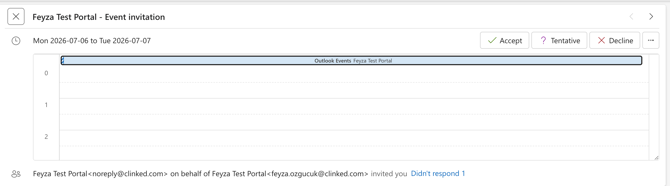
- The member can accept the invitation from Outlook.
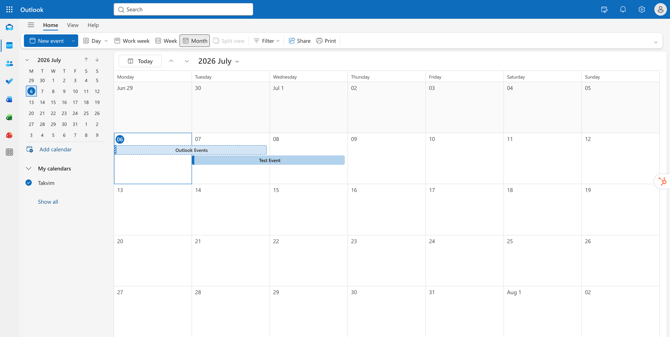
- Once accepted, the event is added to their Outlook calendar.
Creating an event with Outlook invitees
To invite Outlook users to a Clinked event:
- Go to the relevant group in Clinked.
- Open the Events area.
- Create a new event.
- Add the event details, such as the title, date, time, and description.
- Invite the relevant members to the event.
- Save or create the event.
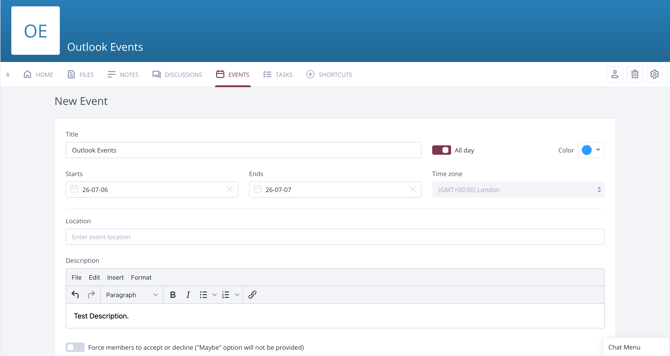
The invited members will receive the event invitation by email. If they are using Outlook, they can accept the invitation from their Outlook inbox.
What the invited user needs to do
The invited user should open the calendar invitation in Outlook and select Accept.
After accepting the invitation, the event will be added to their Outlook calendar.
Important notes
If the user cannot see the invitation, they should check their inbox, junk/spam folder, and any email rules that may be moving calendar invitations.
The invitation is sent to the email address linked to the member’s Clinked account, so please make sure the user’s email address is correct.
If you have any questions, please contact us at support@clinked.com