
How it works
When the integration is enabled for a group, the Zendesk widget becomes available within that group only. This means you can enable the widget for selected groups, keep it disabled for others, or use different Zendesk widgets in different groups.
How to enable the Zendesk widget integration- Go to the group where you want to enable the Zendesk widget.
- Open the group settings.
- Navigate to the Integrations section.
- Turn on the toggle for Zendesk.
- Paste the code snippet from Zendesk.
- Click Enable.
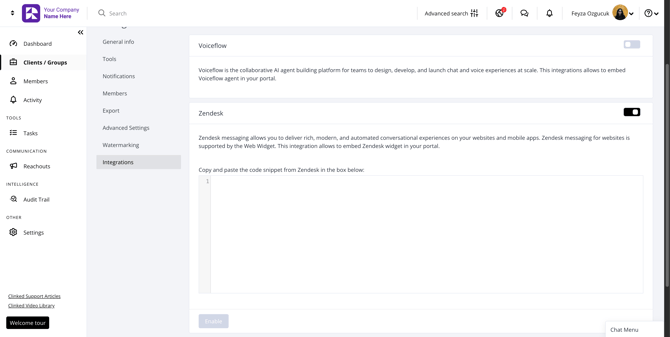
Once enabled, the Zendesk widget will appear as a floating action button in the bottom-right corner of the group.
Requirements and important notesThis is a group-level integration, so it only applies to the group where it has been enabled.
Zendesk requires a paid subscription. The widget setup, configuration, and management are handled within Zendesk.